Code Review with Cursor
Code Review is an integral part of the development workflow, but manual review has limited efficiency and easily misses issues. This article introduces a tool I built that lets Cursor directly read PRs/MRs, analyze code changes, generate review comments, and submit them to the corresponding platform.
Project: https://github.com/OldJii/code-review-mcp
Approach
Cursor itself doesn’t have the ability to access GitHub/GitLab APIs — it needs MCP (Model Context Protocol) for extension. MCP is a protocol by Anthropic that allows AI models to interact with external data sources and tools.
The overall approach:
- Build an MCP Server wrapping GitHub/GitLab APIs
- Configure this MCP Server in Cursor
- Define review standards in mdc rule files to constrain AI’s review behavior
- Chat in Cursor, having AI read PRs, analyze code, and submit comments
MCP Server
The MCP Server is implemented in Python, communicating with Cursor via stdio. The core is an abstract CodeReviewProvider base class, with GitHub and GitLab each implementing their specific logic.
class CodeReviewProvider(ABC):    @abstractmethod    def get_pr_info(self, repo: str, pr_id: int) -> Dict:        pass
    @abstractmethod    def get_pr_changes(self, repo: str, pr_id: int) -> Dict:        pass
    @abstractmethod    def add_inline_comment(self, repo: str, pr_id: int, file_path: str,                          line: int, line_type: str, comment: str) -> Dict:        pass
@abstractmethod def add_pr_comment(self, repo: str, pr_id: int, comment: str) -> Dict: passThe API differences between GitHub and GitLab are mainly in two areas:
- Authentication: GitHub uses Bearer Token; GitLab uses PRIVATE-TOKEN Header
- Inline comments: GitLab requires computing
line_code; GitHub directly uses line numbers
Token Retrieval
To simplify configuration, rather than having users manually enter tokens, we reuse authentication from the gh and glab CLI tools.
GitHub directly calls gh auth token:
def _get_token(self) -> str: try: result = subprocess.run( ["gh", "auth", "token"], capture_output=True, text=True ) if result.returncode == 0: return result.stdout.strip() except FileNotFoundError: pass return ""GitLab requires parsing from glab’s config file:
def _get_token(self) -> str:    config_paths = [        Path.home() / ".config" / "glab-cli" / "config.yml",        Path.home() / "Library" / "Application Support" / "glab-cli" / "config.yml",    ]
for config_path in config_paths: if config_path.exists(): with open(config_path, 'r') as f: content = f.read() pattern = rf'{re.escape(self.host)}:.*?token:\s*([^\s\n]+)' match = re.search(pattern, content, re.DOTALL) if match: return match.group(1).strip() return ""This way, users only need to run gh auth login or glab auth login, and the MCP Server automatically picks up the token.
GitLab Inline Comments
GitLab’s inline comment API is more complex, requiring a line_code parameter. This parameter’s format is {head_sha}_{old_line}_{new_line}, which needs to be parsed from the diff.
def _find_line_code(self, diff: str, target_line: int, line_type: str, head_sha: str) -> str:    lines = diff.split('\n')    old_line = 0    new_line = 0
    for line in lines:        if line.startswith('@@'):            match = re.match(r'@@ -(\d+)(?:,\d+)? \+(\d+)(?:,\d+)? @@', line)            if match:                old_line = int(match.group(1)) - 1                new_line = int(match.group(2)) - 1        elif line.startswith('-'):            old_line += 1            if line_type == "old" and old_line == target_line:                return f"{head_sha}_{old_line}_"        elif line.startswith('+'):            new_line += 1            if line_type == "new" and new_line == target_line:                return f"{head_sha}_{old_line}_{new_line}"        else:            old_line += 1            new_line += 1
return ""The core logic traverses diff content, parses starting line numbers from @@ headers, then tracks old_line and new_line changes to find the line_code for the target line.
MCP Tools
Six tools are ultimately exposed to Cursor:
| Tool | Description |
|---|---|
get_pr_info | Get PR/MR title, description, branch info, etc. |
get_pr_changes | Get code changes, supports file type filtering |
extract_related_prs | Extract related PR links from descriptions |
add_inline_comment | Add an inline comment |
add_pr_comment | Add an overall comment |
batch_add_comments | Batch add comments |
batch_add_comments exists to reduce the number of user confirmations by submitting all comments at once.
Review Standards
MCP solves the “what can be done” question; “how to do it” is constrained through mdc rule files.
mdc is Cursor’s rule file format, definable in a project’s .cursor/rules/ directory. AI references these rules during conversations.
Core Principles
The review standard’s core is “understanding first”:
- Understand the overall PR purpose before examining specific diffs
- Deep analysis (architecture/logic/performance) takes priority over style checking
- Only raise “confirmed issues,” not “possible issues”
- Analyze with context, don’t judge in isolation
The last point is crucial. A common AI mistake is seeing a possibly-null variable and flagging NPE risk, when the caller has already validated it. The rules explicitly require AI to trace context to avoid false positives.
Review Flow
The rules define a complete review flow:
- Get changes: Call
get_pr_changesfor all files’ complete diffs - Understand context: Grasp PR purpose from title, description, and change list
- Deep analysis: Analyze architecture, logic, performance, and security per file
- Deduplicate: Merge identical issues in the same file to avoid duplicate comments
- Preview confirmation: Display all comments for user confirmation
- Batch submit: Call
batch_add_commentsto submit all at once
Step 5 is key. AI-generated comments need human vetting to avoid submitting low-quality or incorrect feedback.
Priority Levels
Issues are categorized into three severity levels:
- P0: Crashes, memory leaks, severe performance issues, security vulnerabilities
- P1: Architecture issues, logic flaws, code quality
- P2: Code reuse, naming improvements
P0 issues have no quantity limit; P1 and P2 dynamically adjust based on P0 count. If P0 exceeds 10, code quality is poor — reduce P1/P2 count to focus on critical issues.
Avoiding False Positives
The rules enumerate common false positive scenarios:
| Type | False Positive Condition | Action |
|---|---|---|
| NPE | Caller already validates | Don’t flag |
| Out of bounds | Length checked upstream | Don’t flag |
| Performance | Data size ≤ 5 | Don’t flag |
| Threading | Duration < 1ms | Don’t flag |
These rules are distilled from real review experience. AI tends toward conservative judgments, easily flagging non-issues. These rules help AI more accurately identify genuine problems.
Usage
Configuration
MCP configuration is global — edit ~/.cursor/mcp.json:
{ "mcpServers": { "code-review": { "command": "python3", "args": ["/path/to/cursor-ai-code-review/code_review_mcp.py"] } }}Review standards are project-level and need to be copied to each project’s .cursor/rules/ directory. This design accounts for different projects potentially having different review standards.
Reviewing
Once configured, simply type in Cursor:
Review https://github.com/owner/repo/pull/123AI automatically calls MCP tools to fetch PR information and code changes, then reviews per the rules. After review, all comments are displayed for confirmation:
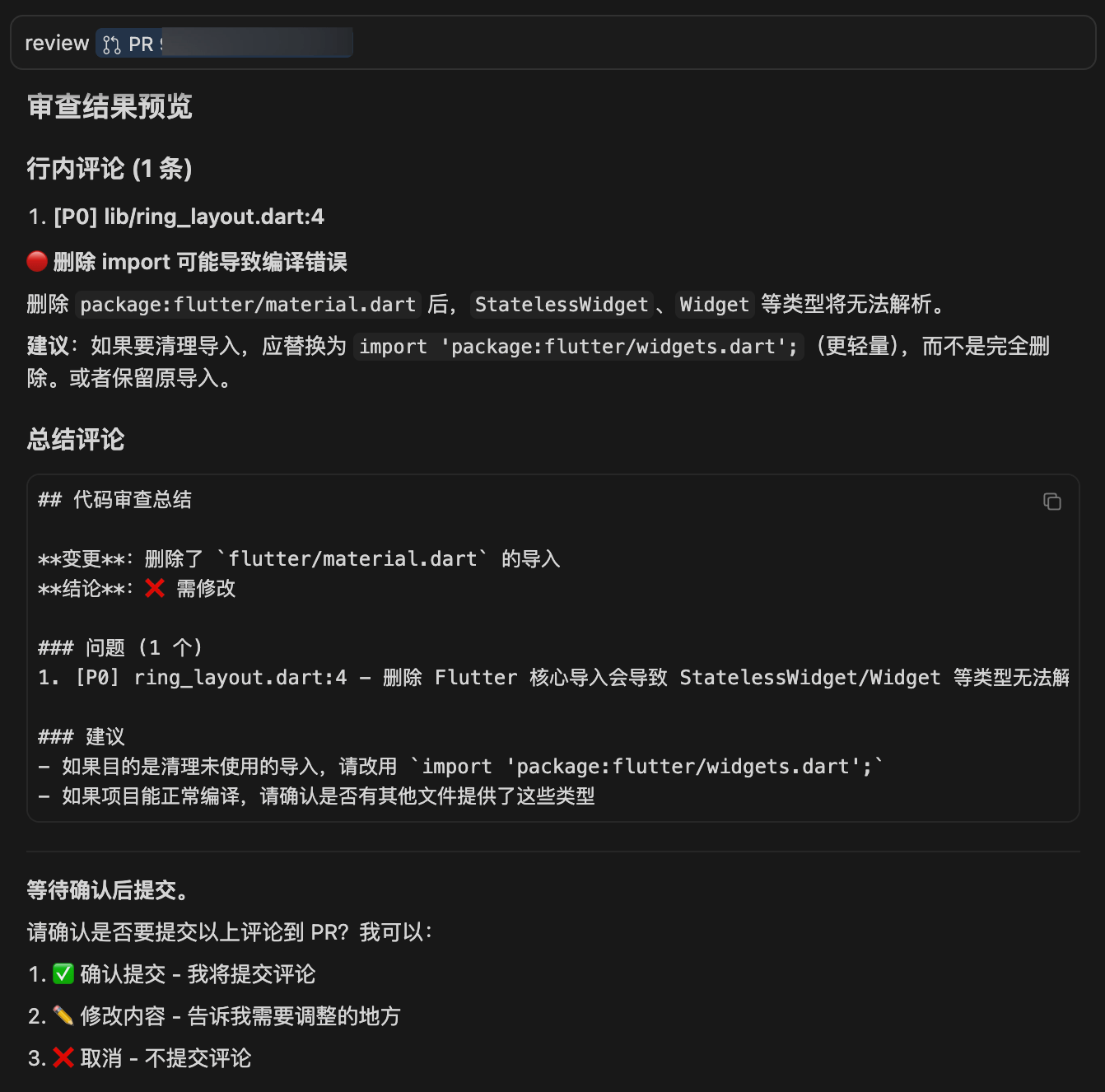
I deleted one line of import code from a Dart file in a Flutter project to demonstrate the tool’s workflow.
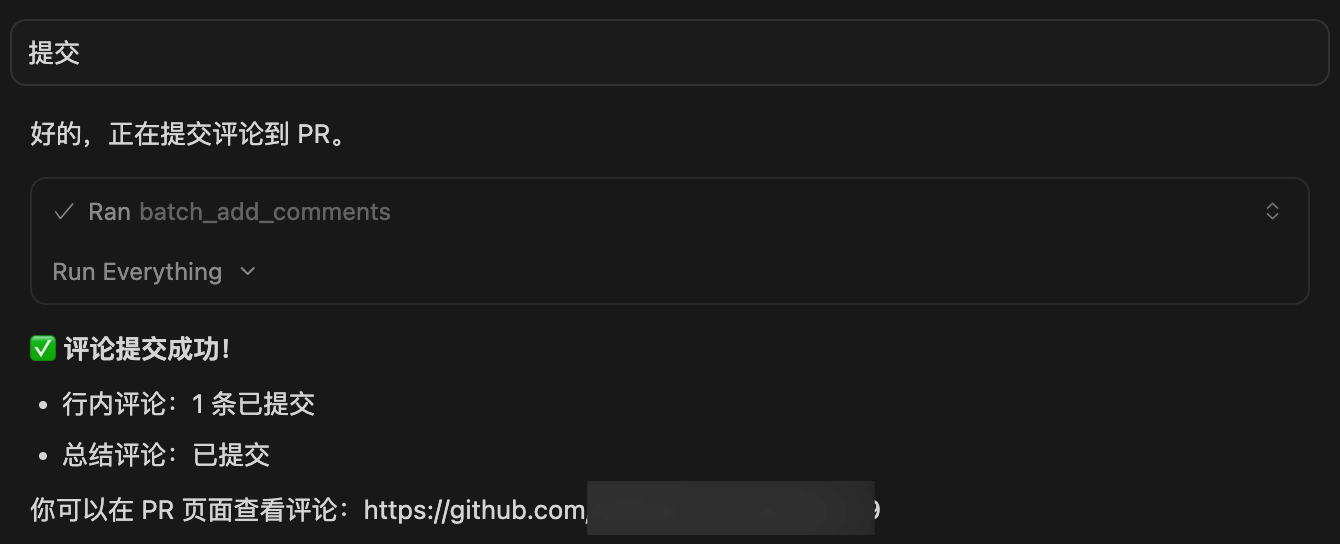
After confirmation, AI calls batch_add_comments to batch-submit comments to GitHub/GitLab.
Private GitLab
For self-hosted GitLab deployments, specify the address during authentication:
glab auth login --hostname gitlab.yourcompany.comThe MCP Server automatically reads the corresponding token from glab’s configuration.
Limitations
This tool currently has some limitations:
- Limited context: AI can only see the diff, not the complete project code. Analysis ability is limited for issues involving multi-file interactions.
- Rule dependency: Review quality largely depends on the completeness of mdc rules. Poorly written rules mean AI may miss issues or produce false positives.
- Human confirmation required: Every comment submission requires human confirmation — cannot be fully automated. This is intentional to prevent AI from submitting low-quality comments.
Future improvements could include integrating more context, such as letting AI read related files and view commit history. Rules can also be continuously refined based on actual usage.
Summary
The core value of this tool is delegating the mechanical aspects of Code Review to AI, with humans only needing to confirm final results. In practice, AI’s detection rate for routine code issues (null pointers, resource leaks, performance hazards, etc.) is quite reasonable.
But AI cannot fully replace human review. Architecture design and business logic — issues requiring deep contextual understanding — still need human judgment. Using AI as an assistive tool that improves efficiency while maintaining human oversight is the most pragmatic approach today.